Next-gen RCP

Time tracking of a new generation

Automated time tracking, smart schedules, full labor-law compliance, and advanced AI analytics. Everything in one place.

Start 14 days free
No credit card
14 days free
24/7 support
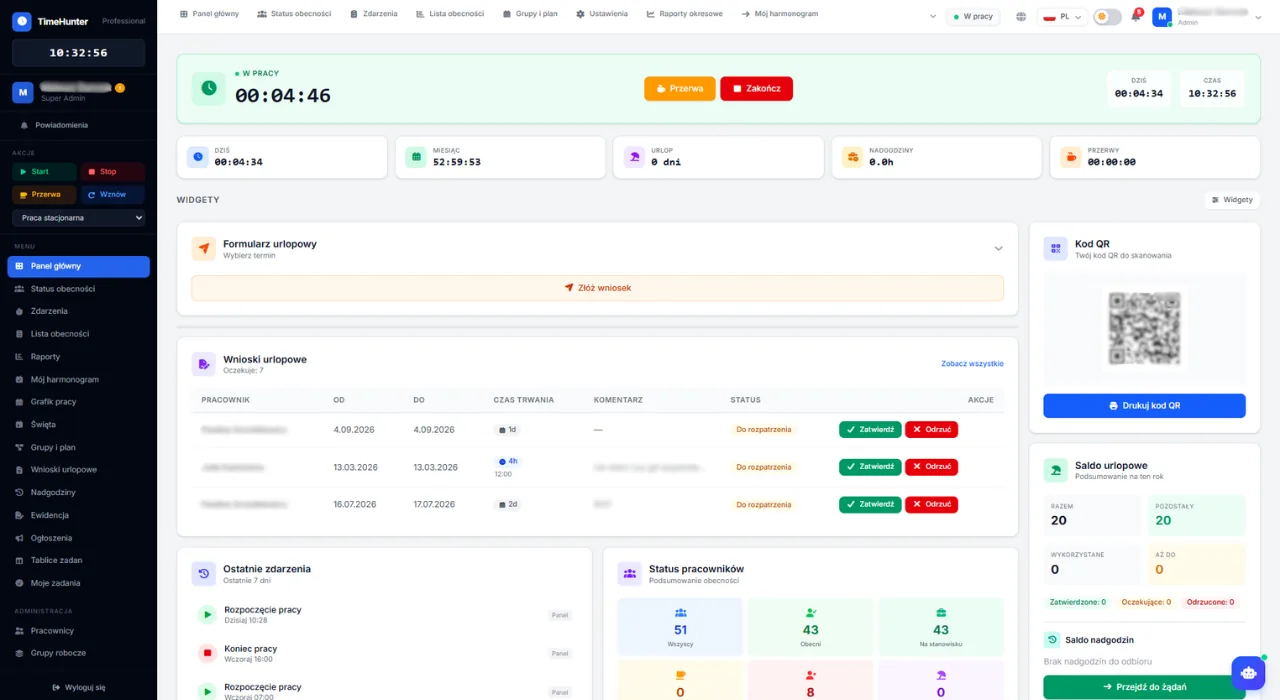
timehunter.pl/dashboard
System ewidencji czasu pracy online — panel główny TimeHunter z listą obecności i statystykami
0.0%
SLA uptime
0 min
Company setup
0
Trial days, no card
0
Features in system
GDPR compliantSSL/TLS · encryptionEU servers4.8/5 from 47 reviewsMulti-country PL + CZ2FA loginGDPR compliantSSL/TLS · encryptionEU servers4.8/5 from 47 reviewsMulti-country PL + CZ2FA login
No more chaos

Still tracking time by hand?

Spreadsheets and chat until month-end mean payroll errors and audit stress. TimeHunter does it for you — automatically and compliantly.

The old way

  • Spreadsheets with payroll errors
  • Paper attendance cards
  • 8h/week on Monday schedules
  • Labor inspection = stress
  • Employees clock in for colleagues

With TimeHunter

  • Automatic records, labor-law compliant
  • Employees scan QR — zero errors
  • Monthly schedule in 20 minutes
  • Audit-ready PDF in 5 seconds
  • Identity: QR / GPS / NFC / photo

Our customers save on average 6 hours a week on work-time admin alone.

See how it works

A real application, real capabilities

We don't just promise — we show. Here's what daily work time management looks like in TimeHunter.

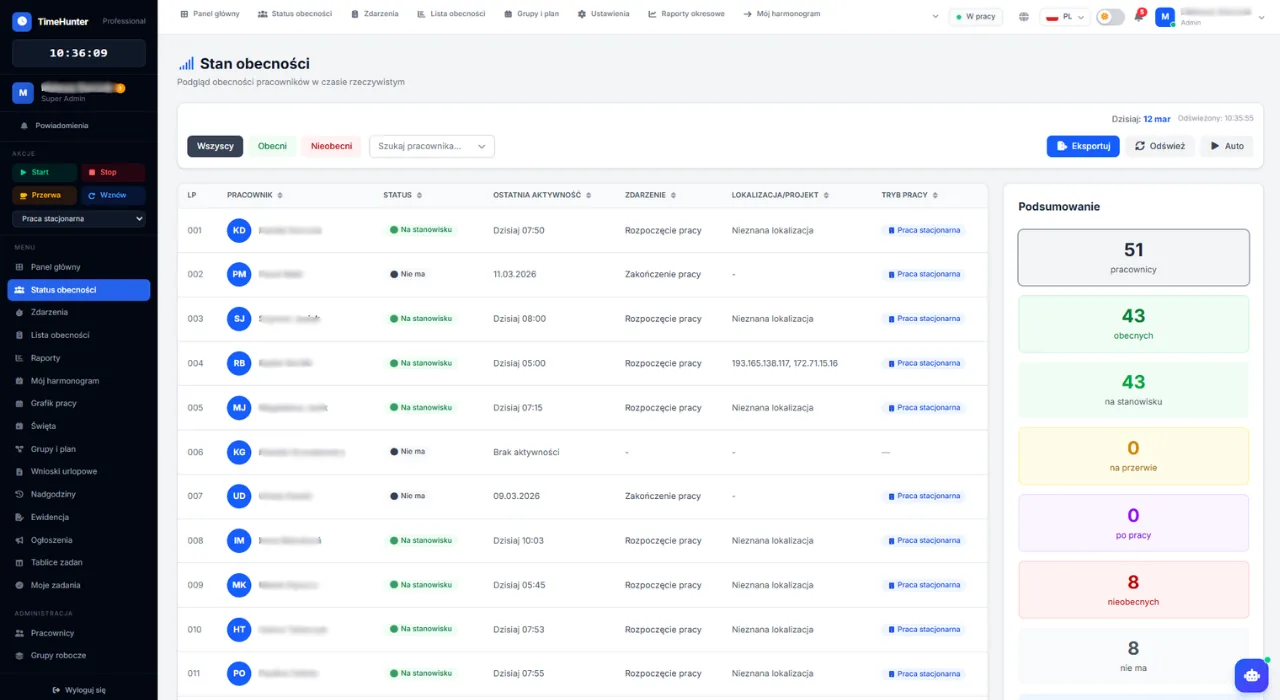
timehunter.pl/status
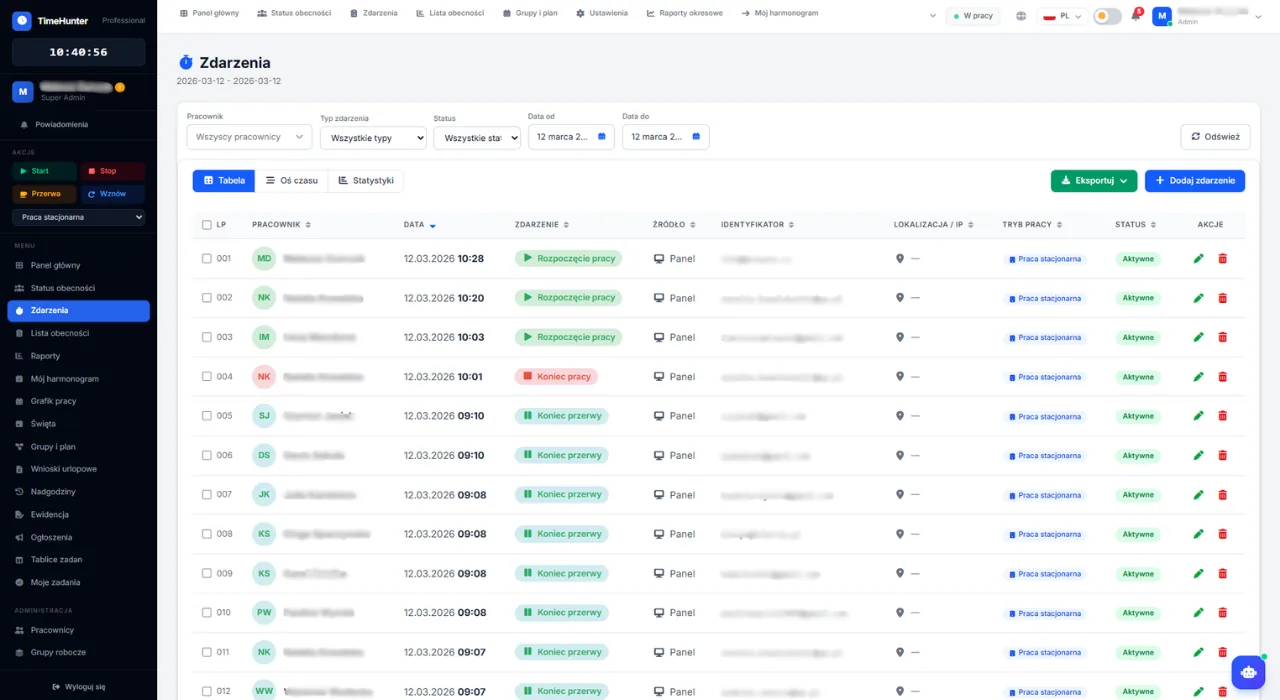
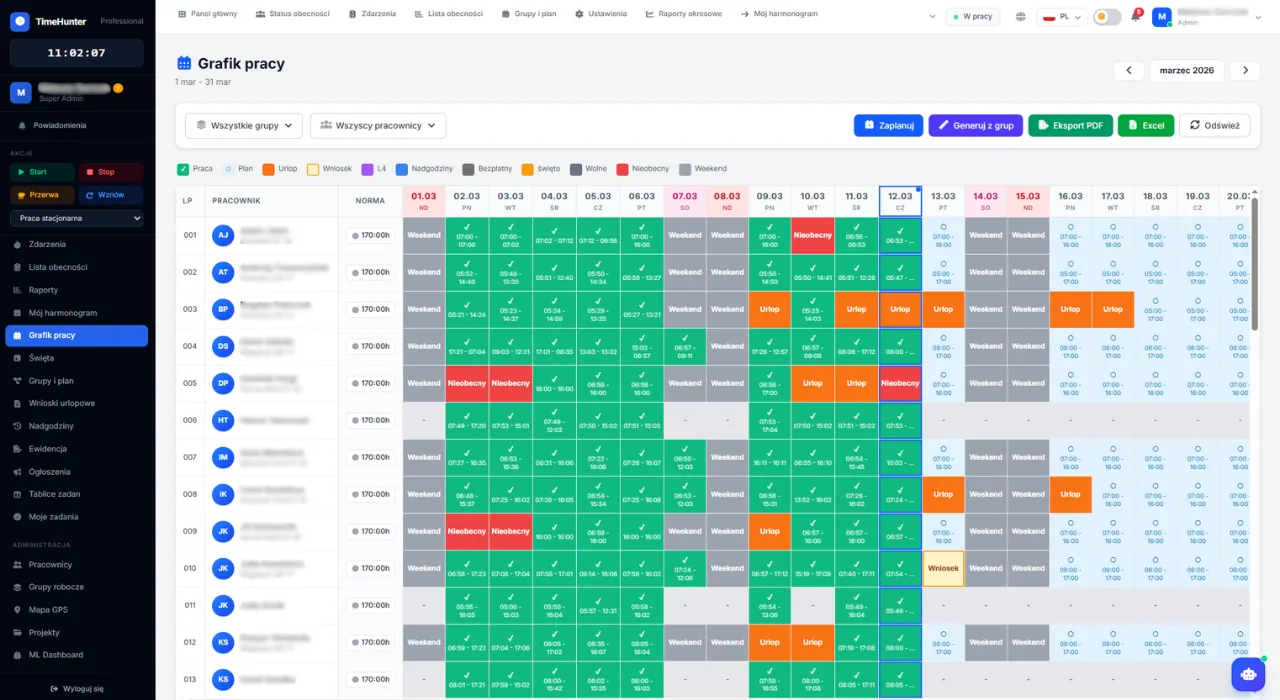
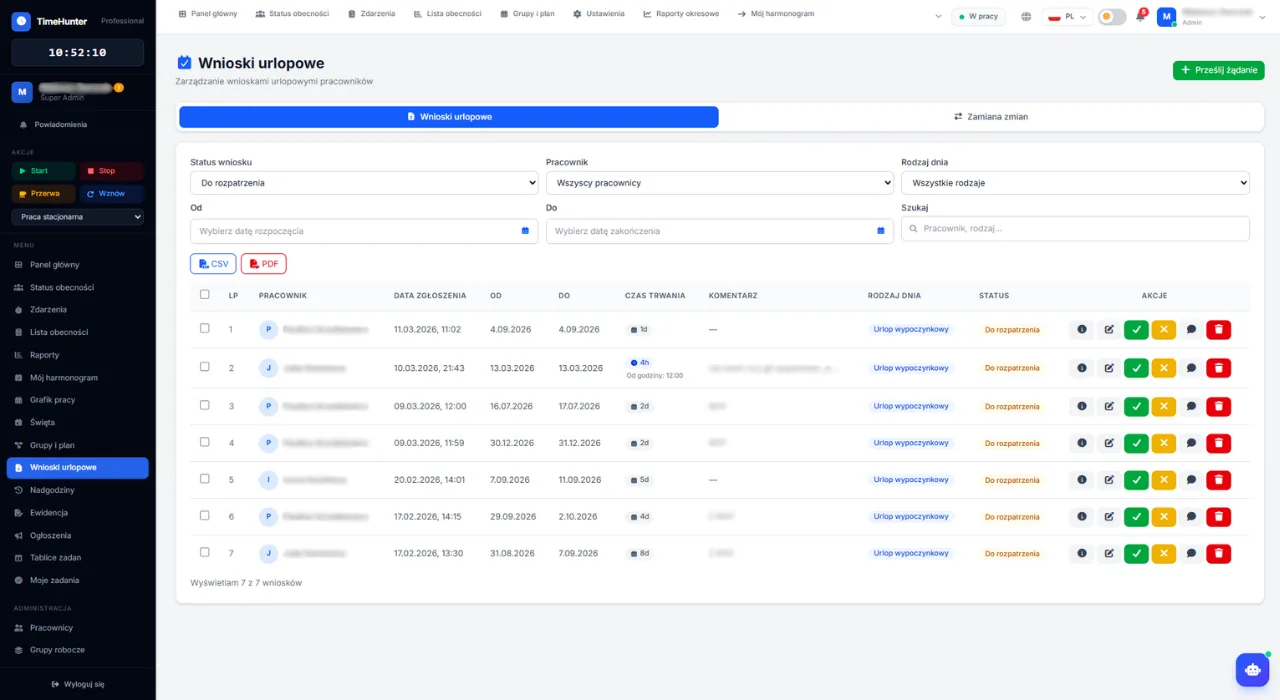
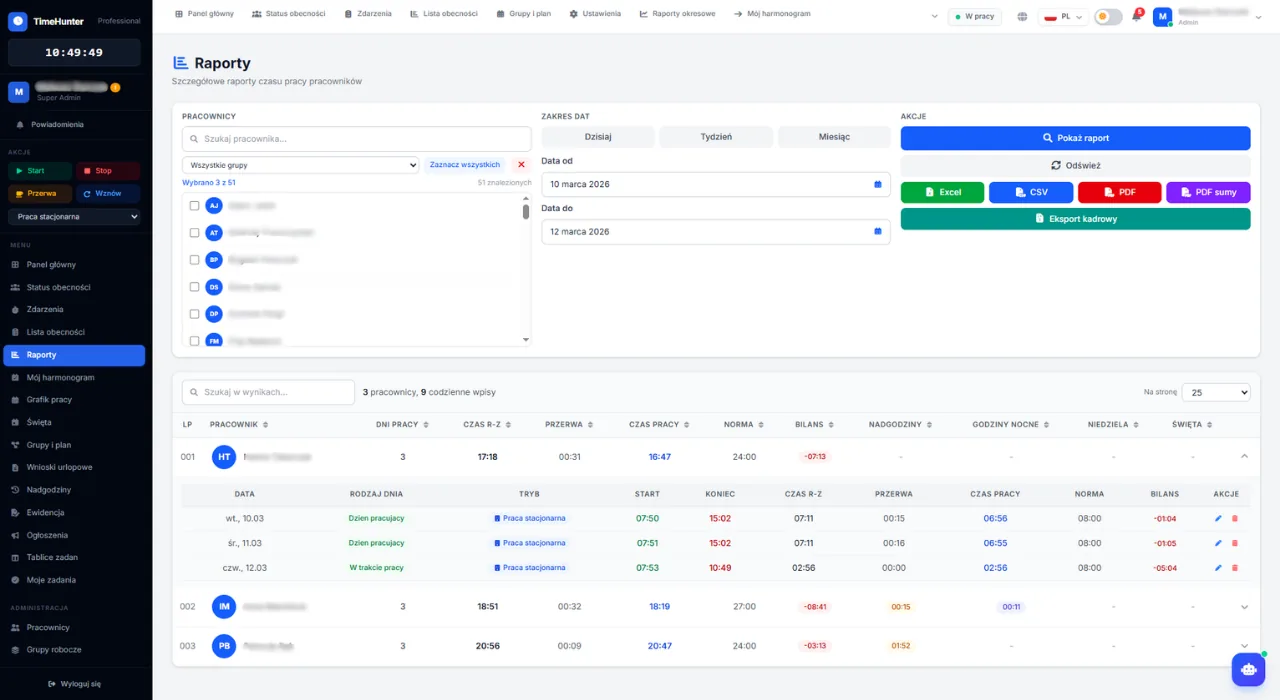
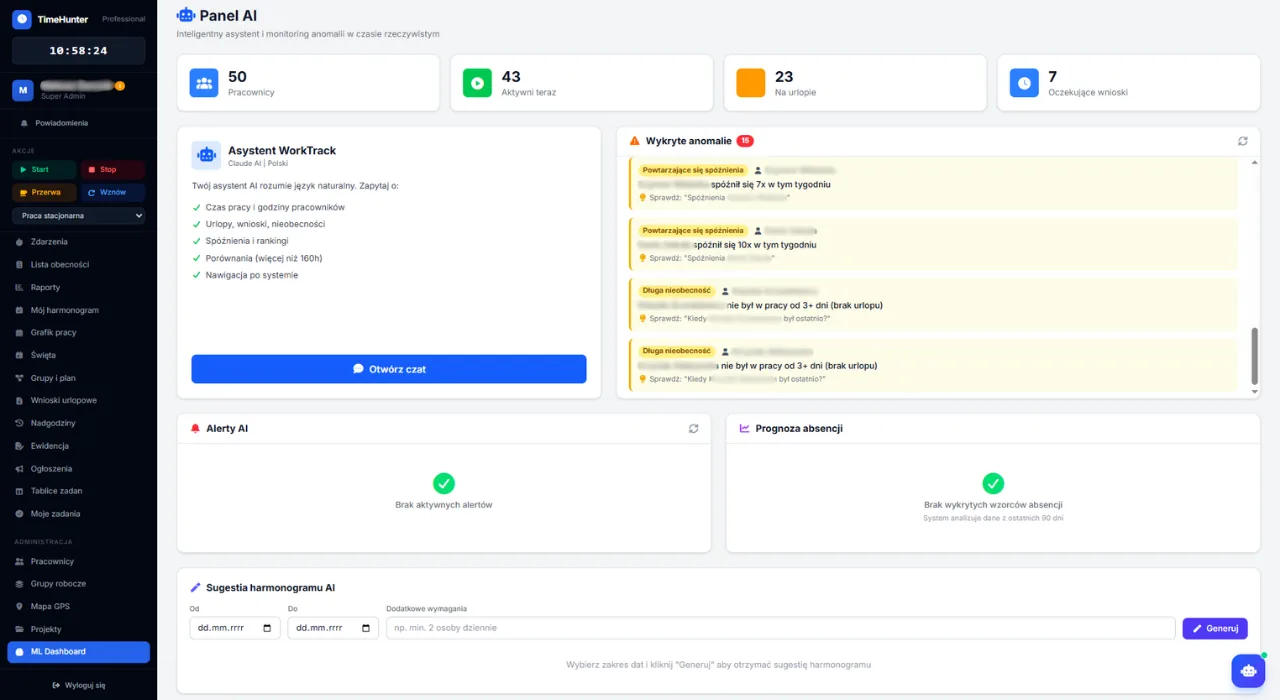
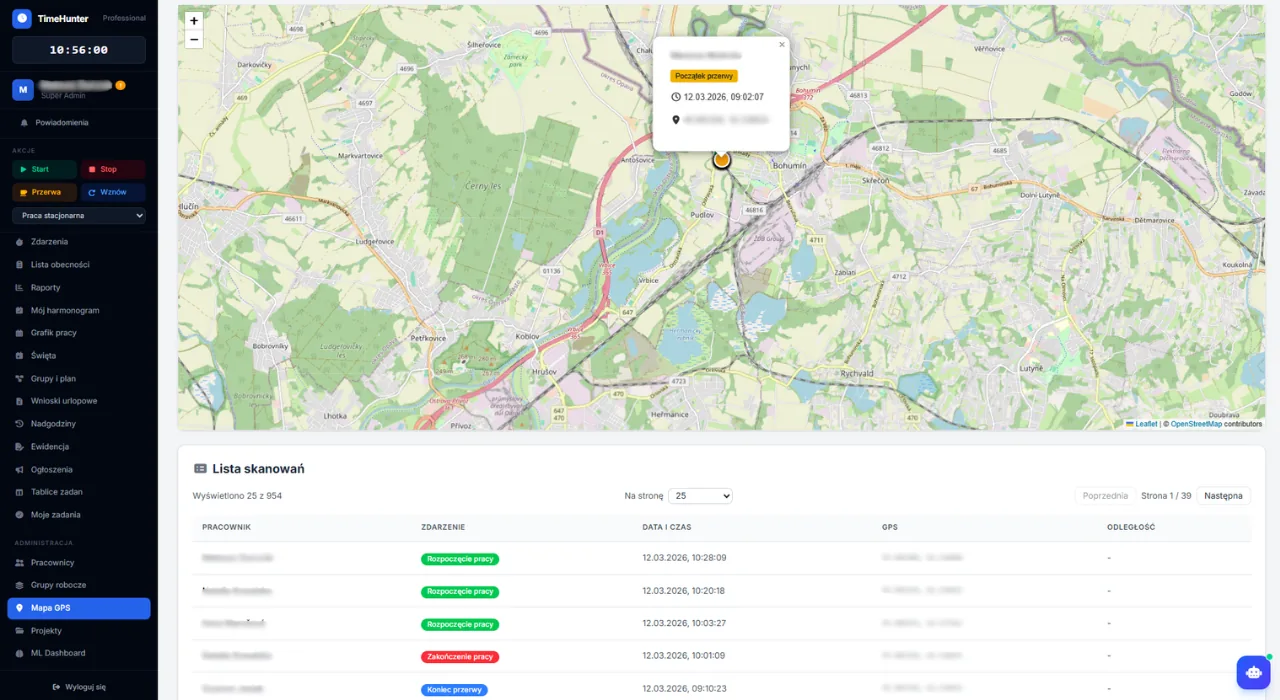
TimeHunter — DashboardTimeHunter — Attendance statusTimeHunter — EventsTimeHunter — Work scheduleTimeHunter — Leave requestsTimeHunter — ReportsTimeHunter — AI analyticsTimeHunter — GPS map
Features

Everything for work time management

A complete tool for companies of any size. From time tracking to advanced AI analytics.

Time tracking

Fast registration using QR codes, GPS, and NFC. Works offline (PWA) — field workers without internet can clock in, and data syncs automatically when back online.

Schedule, shift swaps & planner

Intuitive shift planning with views for employees and managers. Shift swaps between coworkers with manager approval. Individual schedule for every employee.

Leave management with attachments

Electronic leave requests with file attachments (sick notes, certificates). Multi-level approval, automatic balances, request history, and team absence calendar.

Reports & payroll export

Precise calculations based on real sessions. CSV/PDF export plus dedicated payroll export with overtime, night hours, leave days, and sick days.

Legal compliance

Full GDPR and labor-law compliance. Audit trail, limit checks, and automatic alerts for violations.

AI Analytics & predictions

Anomaly detection, absence prediction based on patterns, optimal schedule suggestions, and auto-alerts (lateness trends, overtime limits, low leave balance).

Employee QR codes

Individual QR code generation for each employee. Scan via mobile app or tablet — clock in within a second.

Project time tracking

Assign work sessions to projects. Reports with hours broken down by project with charts. Project management with codes and colors — like Toggl, but built-in.

Who it is for

Recognize yourself and pick the right fit

TimeHunter addresses the specific pain of 5 roles. Pick yours — see how it fits you.

5–30 people

Small business founder

Hospitality · Retail · Warehouse · Office

Your pain

Excel + WhatsApp until end of month, constant payroll errors, employees complaining.

Try 14 days free

What TimeHunter gives you

  • Sign up in 2 minutes
  • 14-day free trial, no card
  • Intuitive UI — no training needed
1 system · no add-ons for the basics

Not 5 features. A full 68 features in one system

Competitors charge extra for schedules, leave or reports. With TimeHunter you get the whole set — from QR check-in to AI analytics. Here is the full list of what works from day one.

Time tracking

12
  • QR scanning
  • GPS check-in
  • NFC tags
  • Web panel
  • iOS + Android app
  • Android kiosk offline
  • Photo check-in
  • Start / stop sessions
  • Breaks & alerts
  • Auto-close 12h
  • Work modes
  • Session editing (admin)

Live attendance

4
  • Real-time status
  • Employee statuses
  • Company stats
  • Events timeline

Schedules

9
  • 3 schedule views
  • Week copy
  • Shift templates
  • Work groups
  • Shift swaps
  • Holiday work
  • Conflict detection
  • My schedule
  • Schedule PDF export

Leave management

7
  • 7 leave types
  • Multi-step approval
  • PDF/JPG attachments
  • Bulk approval
  • Auto leave balance
  • PL + CZ holidays
  • Hourly requests

Overtime

5
  • Overtime balance
  • Overtime types
  • Auto time-off
  • Time rounding
  • 150h limit alert

Labor law compliance

3
  • Polish labor code
  • Czech labor code
  • Compliance alerts

Reports & exports

5
  • 7 report types
  • PDF/Excel/CSV export
  • Work card (art. 149)
  • Scheduled email reports
  • Payroll export

Project billing

6
  • Client database
  • Time per client
  • Billing dashboard
  • Invoice PDF
  • Custom rates
  • Hourly payroll rates

AI & analytics

5
  • AI Assistant (chat)
  • Anomaly detection
  • Absence prediction
  • AI schedule suggestion
  • AI alerts

Task management

2
  • Kanban boards
  • “My tasks” widget

Communication

2
  • Company announcements
  • Push notifications

GPS location

2
  • Geofencing zones
  • GPS trail (heatmap)

Platform & security

6
  • REST API + Webhooks
  • API keys + rate limit
  • Audit logs
  • 2FA login
  • Multi-country + 3 languages
  • Multi-tenant + RLS
Time tracking

5 check-in methods — pick the best for your team

QR, offline Android kiosk, GPS, NFC, web panel and a mobile app. Employees clock in the way that fits your industry.

QR scan (phone)

Each employee has a unique QR code. Scan with a phone camera — no app install, 100% in the browser.

Android QR kiosk (offline)

Old tablet + WorkTrack Scanner app. Offline mode, background sync, optional photo capture.

GPS check-in

Employee taps “Start”, the system logs coordinates. Optional geofencing with out-of-zone alerts.

NFC tags

Tags at the entrance — tap a phone. Ideal for factories (gloves, dirty hands).

Web panel + mobile app

Remote/office work: Start/Stop/Break in the browser and in the iOS + Android app with GPS.

Add-on

Photo anti-fraud check-in

A photo on every scan — no more buddy-punching. Time-stamped archive, GDPR compliant.

TimeHunter — Live attendance online
Real-time

Live attendance online

See live who is working, on break, or on leave. Data updates after every QR scan, GPS check-in or tap.

  • Statuses: work / break / off / leave
  • Company stats and group filters
  • CSV/PDF export (for audits)
  • Each employee sees only themselves (GDPR)
TimeHunter — Schedules built in 20 minutes
Planning

Schedules built in 20 minutes

Plan the whole team’s shifts instead of losing 8 hours on Monday. Copy a template week to the whole month in one click.

  • 3 views: table, heatmap, quick-plan
  • Shift templates + multi-select
  • Auto conflict detection (missing 11h rest)
  • A4 PDF export + push to employees
TimeHunter — 7 leave types with multi-step approval
Leave

7 leave types with multi-step approval

Requests in days and hours, with attachments and automatic balance. Managers approve from the phone, balance updates itself.

  • Workflow: employee → manager → HR → admin
  • Balance with auto-deduction
  • PL + CZ holiday calendar (movable)
  • Bulk approve/reject for admins
TimeHunter — 7 report types + payroll export
Reports

7 report types + payroll export

Daily, monthly, per-employee reports and a labor-law work card. Export to any Polish or Czech payroll software.

  • PDF / Excel / CSV (correct encoding)
  • Work card (audit-ready PDF)
  • Scheduled email reports
  • Export: Optima, Symfonia, Pohoda, Money S3
Labor-law compliance

Automatic checks of 11 rules of PL and CZ labor codes

A red alert appears before you publish a schedule that breaks the rules. For audits — full documentation in 5 seconds.

Poland — Labor Code

  • Art. 1298h/day, 40h/week norm
  • Art. 132Min. 11h daily rest
  • Art. 133Min. 35h weekly rest
  • Art. 149Working-time records
  • Art. 151150h overtime/year limit

Czechia — Labor Code

  • § 798h/day, 40h/week norm
  • § 8830 min break at ≥6h
  • § 9011h daily rest
  • § 9235h weekly rest
  • § 93Max 48h/week with overtime
  • § 94Night work max 8h/day

Every schedule change, every clock-in and every leave request is checked automatically before any rule is broken.

Add-on · Project billing

Bill clients by the hour without spreadsheets

For accounting firms, law firms and agencies billing clients hourly. Time per client × rate → invoice PDF in a second.

Client database

CRUD + CSV import, custom hourly rates per client.

Time per client

Assign sessions to clients and projects. No more 60-client spreadsheets.

Billing dashboard

Hours × rate = amount. Live preview, invoice-ready.

Invoice PDF in one click

Per-client hours summary ready to attach to an invoice.

“Project billing” add-on — €0.49 / user / month

Accounting firmsLaw firmsMarketing agenciesSoftware house / IT
Addon · Kanban boards

Trello you don’t need to buy separately

A light task board wired into work time. No more clicking between Trello, Asana and your attendance panel.

Backlog

2
klient

Invoice June — Client A

marketing

New LinkedIn campaign

Doing

1
IT

DB migration — sprint 3

JK2

Review

1
prawo

Lease contract — review

AN2

Done

1
HR

Employee onboarding

Project boards

Each project = a board with 4 columns (Backlog · Doing · Review · Done).

Drag & drop

Drag cards between columns. The assignee gets a notification.

Labels + priorities

Color labels, due dates, priorities, attachments — everything you need.

“My tasks” widget

Employee sees all their tasks from every board in one place.

Addon “Kanban boards” — €0.50 / user / month

Try addon
AI Assistant · 2026

Ask your company in plain language

A built-in AI assistant analyzes your company data in a second: lateness, overtime, absences, anomalies. Ask it like a human — it answers with specifics and suggests an action.

  • Chat with your company data in natural language
  • Anomaly detection in work time
  • Absence prediction (ML scoring)
  • Automatic schedule suggestion
  • AI alerts: lateness, overtime, low leave balance
TimeHunter AI online
Which employees have the most late arrivals this month?
3 people exceeded 5 late arrivals: Jan K. (8×, avg 12 min), Anna N. (6×, avg 18 min), Piotr W. (5×, avg 8 min). Send them an automatic reminder?
Ask anything about your company data…
Addon · GPS & Geofencing

Know who is working and where they really are

For field-based companies — construction, transport, service. Zones, GPS trails and alerts, with privacy respect.

GPS check-in

Employee taps Start — system logs coordinates, time and accuracy.

Geofencing zones

Define polygons (site, office, warehouse). Out-of-zone alerts.

GPS trail (heatmap)

Daily route with event markers. Red zones = excess time.

Anti-fraud + GDPR

Location only during work, with in-app notification. Employee knows when.

timehunter.pl/locations
TimeHunter — employee GPS map, geofencing zones and routes

Addon “GPS & Geofencing” — €0.75 / user / month

Construction & field teamsTransport & couriersInstallation serviceField sales
Try addon
Addon · Photo check-in

No more “buddy punching”

Selfie + GPS watermark at every Start/Stop. Anti-fraud that pays for itself — one caught case is enough.

Check-in with selfie08:02
52.2297° N · 21.0122° E
2026-06-09 08:02:14
Jan Kowalski · ID 1024

Selfie at every Start/Stop

App snaps a selfie from the front camera at check-in. No selfie = no entry.

Watermark: GPS + time + employee

Each photo has a baked-in watermark — cannot be swapped or staged in advance.

Selfie gallery for admins

Manager reviews the day’s photos in a timeline. Suspicious? Click → request explanation.

GDPR compliant

Encrypted photos, configurable retention (30/60/90 days). Consent in policy.

Addon “Photo check-in” — €0.50 / user / month

ConstructionWarehouses & logisticsHospitality (kitchen)Cleaning & housekeeping
Try addon
Integrations & API

Export to any payroll software

Open REST API, webhooks and ready-made exports to Polish and Czech payroll software. Your data flows where you need it — no manual re-entry.

Comarch Optima Symfonia Comarch ERP enova365 Sage Tetam Kadry Comarch Optima Symfonia Comarch ERP enova365 Sage Tetam Kadry Comarch Optima Symfonia Comarch ERP enova365 Sage Tetam Kadry
Pohoda Money S3 Helios ABRA FlexiBee Pohoda Money S3 Helios ABRA FlexiBee Pohoda Money S3 Helios ABRA FlexiBee

Full REST API

Event webhooks

API keys + permissions

Per-key rate limiting

Multi-country

The only system with native support for Poland and Czechia

Local holidays, labor law, currencies and exports — natively for both countries. No “almost fits” compromises.

Polska

  • Polish holidays + movable
  • Polish labor code
  • Export: Optima, Symfonia, Comarch
  • PL-prefixed NIP · VAT invoice in PLN

Česko

  • Czech holidays + Easter
  • Czech labor code
  • Export: Pohoda, Money S3, Helios
  • CZ-prefixed DIČ · DPH invoice in CZK
3 UI languages (PL/CS/EN)3 currencies (PLN/CZK/EUR)EU Multi-VAT validation
Mobile app

iOS + Android included. Offline Android kiosk.

Full functionality on the phone. Managers approve leave on the bus, employees file requests on a break.

iPhone (iOS)

  • Available on TestFlight
  • Dashboard, events, leave, reports
  • Background GPS, haptics, pull-to-refresh

Android (.APK)

  • Full employee app
  • WorkTrack Scanner kiosk app
  • Offline mode + background sync

Mobile web (PWA)

  • Works in the browser
  • Add to home screen
  • Like a native app
Communication

Announcements that actually get through

A board + push to phone instead of emails. See who read it and who didn’t.

A

Admin

2 min ago

Urgent

Schedule change — warehouse

Saturday 14.06 — shift moved to 6:00–14:00.

128
H

HR

1 hr ago

Policy

New GDPR policy

Please review and confirm by end of week.

1913
C

CEO

yesterday

Success

Quarterly bonus

Thank you all — bonus in the June payroll.

2618

Announcement board

Central place for posts, policies, schedule changes. No more “all-staff” emails.

Group targeting

Send only to the “Warehouse” or “Drivers” group. No spam for the rest.

Push to phone

In-app notifications on iOS/Android — instant delivery.

Read receipts

See who read each post. Perfect for policy updates.

Security & GDPR

Your data is safe — encrypted, audited

We store employee data on EU servers, encrypt it in transit and at rest, and give you full GDPR-compliant control.

EU servers (Frankfurt)

Data processed in the EU, GDPR compliant.

End-to-end encryption

SSL/TLS in transit, bcrypt + AES-256 for sensitive data.

Full GDPR compliance

DPA, right to erasure, access auditing.

Two-factor login (2FA)

Extra account protection for admins and employees.

Audit logs

Full change history — who changed what and when.

Multi-tenant + isolation (RLS)

Each company’s data fully isolated at the database level.

Industries

How TimeHunter helps across industries

Concrete deployment scenarios in 6 industries. Each example shows exactly what you gain by switching from paper/Excel to TimeHunter.

Accounting firm — billing clients by the hour

Your accounting team handles work for 60 clients with 8 staff members. Each client has a different hourly rate (e.g. 1500 CZK/h accounting, 2100 CZK/h advisory). TimeHunter has the "Project billing" add-on: employees log time per specific client, you generate ready-to-send PDF summaries for each invoice at month-end. No Excel, no errors, no lost hours.

Construction company — field crews oversight

Your 4 construction crews travel across 3 regions. Previously each foreman rewrote a paper card, sometimes someone signed for a colleague. With TimeHunter every worker records work start in the mobile app with GPS — you see live on the map who is on which site. Geofencing alerts when someone is outside the zone. Full labor-code-compliant records plus GPS evidence in case of disputes.

Restaurant — shift schedules + holiday work

A restaurant with 24 staff on 3 shifts. Previously the manager spent 8h per week on Excel. With TimeHunter she uses the "Planning" view: sets a template week, copies to whole month in one click, edits individual days. The "Work on holidays" feature lets you plan shifts on public holidays (open gastronomy). Employees see the schedule in the app + push on changes.

Warehouse — QR kiosk at entry

Warehouse hall, 35 staff on 2 shifts. An old Android tablet runs the "WorkTrack Scanner" app at the entrance. Everyone scans their QR on entry and exit. Data goes to the server offline (works without internet, syncs when it returns). Manager gets monthly CSV report ready for import into payroll software.

IT / Software house — hybrid work

Team of 18 developers: 6 in-office, 8 remote, 4 hybrid. TimeHunter distinguishes work mode (office / home office / field). Employee clicks start with the appropriate mode, system also records IP. Leave requests, overtime, approvals — everything in the mobile app. Manager sees office occupancy before scheduling team meetings.

Retail chain — multiple locations from 1 panel

A chain of 12 stores, 80 staff, 12 store managers. Each store is a separate work group. Manager sees only their store, operations director sees all. Leave requests go to the store manager, but the director has the global view of staffing gaps. One-click export of consolidated report for the whole chain.

Client Reviews

Trusted by industry leaders

See what companies using TimeHunter daily have to say.

4.8out of 5 — average from 47 customer reviews

We've been using it in our company for over 3 years and it has become a key tool in managing our team's work time – across warehouses, sales, and service departments. The system is highly rated by our employees because it's intuitive, fast, and easy to use, while being incredibly feature-rich, secure, and stable.

T

Tomasz Mrozek

CEO · MROAUTO

Recommended
Comparison

TimeHunter vs the competition

Why companies in Poland and Czechia choose TimeHunter over popular alternatives.

FeatureTimeHunterRCP24ConnecteamCalamari
Polish labor code — auto alertsczęściowo
Czech labor code — auto alerts
Export to Optima / Pohoda / Money S3Optima
Check-in: QR + GPS + NFC + Kiosk + photo5 metodQRGPSweb
Native iOS + Android app
Project billing (per client)dodatek 2 zł
AI Assistant + anomaly analytics
REST API + Webhookstylko Enterprise
GDPR — EU serversUSAEU
Price from (per user / month)14 zł12 zł$29 / firmę€2.5
14 days free, no card7 dni

Data based on public pricing pages and competitor materials (as of 2026). We encourage independent verification.

Pricing

Clear pricing, no hidden costs

Choose a plan that fits your company. 14 days free on Micro, Start, and Professional.

Micro

For freelancers and micro-businesses. Basic time tracking.

0.99EUR/user/mo.
  • Time tracking (web)
  • Dashboard with widgets
  • Attendance history
  • Reports (CSV/PDF)
  • Employee management
  • Holiday calendar
  • Break timer
  • Email support
  • Up to 5 employees
Try for free
Start

Perfect to start. Full RCP with leave and overtime.

1.49EUR/user/mo.
  • Everything from Micro
  • Leave requests
  • Leave balance
  • Overtime (basic)
  • Break alerts
  • Late arrival detection
  • Work time panel (admin)
  • Employee status
  • Up to 15 employees
Try for free
Most popular
Professional

Complete solution for growing companies.

2.89EUR/user/mo.
  • Everything from Start
  • 3 registration methods (web, QR, PIN)
  • Multiple work schedules
  • Work groups and locations
  • Overtime (advanced)
  • Schedule and work plan
  • Announcements board
  • Email reports
  • Phone support
  • Unlimited employees
Try for free
Enterprise

Full power with API, AI, and dedicated support.

Custom

quote

  • Everything from Professional
  • All registration methods
  • Multi-step approval
  • Work time rounding
  • Salary simulation
  • REST API access
  • System logs (audit)
  • Custom branding (logo, colors)
  • AI Analytics / ML
  • Priority support + SLA
Contact us

Micro, Start, and Professional include a 14-day free trial. Enterprise — custom quote. Net prices per user per month. VAT invoice.

Add-ons

Add-ons that give you more power

Activate each add-on separately — pay only for what you actually need.

0.25 EUR

Photo Registration

EUR / employee / mo.

Automatic photo capture during QR scan. Confirms physical presence and prevents buddy punching.

  • Photo on start/stop/break
  • Timestamped photo archive
  • Admin panel preview

Available for plans:

Start, Professional, Enterprise

0.25 EUR

Location BASIC

EUR / employee / mo.

GPS coordinates captured at each event. Map with colored markers and distance calculation from company headquarters.

  • GPS on start/stop/break
  • Map with event markers
  • Geofencing — distance from HQ

Available for plans:

Professional, Enterprise

0.59 EUR

Location PREMIUM

EUR / employee / mo.

Continuous route tracking in the background during active work sessions. Polyline on map, position history and route statistics.

  • GPS tracking every 2 minutes
  • Route polyline on map
  • Distance, time, speed
  • Trail point timeline

Available for plans:

Professional, Enterprise

0.69 EUR

AI Assistant

EUR / employee / mo.

Intelligent AI assistant analyzing work patterns, detecting anomalies, and generating reports in natural language.

  • Work pattern analysis
  • Anomaly detection & alerts
  • Natural language reports
  • Team workload forecasting

Available for plans:

Start, Professional, Enterprise

0.49 EUR

Employee App

EUR / employee / mo.

Native mobile app for employees. Self-service time tracking, breaks, leave requests and events — directly from their phone.

  • One-tap start/stop work
  • Break management
  • Leave requests from phone
  • Background GPS tracking

Available for plans:

Start, Professional, Enterprise

0.49 EUR

Project Billing

EUR / employee / mo.

Bill employees hourly per client — for accounting firms, law firms and agencies. Each client has custom hourly rates, rate snapshot at work start, invoice-ready PDF with one click.

  • Client database with CSV import
  • Up to 3 rates + 2 markups per client
  • Live dashboard "who is working on what"
  • Invoice-ready PDF summary
  • Custom rate for non-standard tasks

Available for plans:

Start, Professional, Enterprise

Feature comparison

Feature comparison

FeatureMicroStartProfessionalEnterprise
Dashboard
Employee status
Event registration
Attendance history
Time tracking (QR/GPS)
Employee QR codes
Break timer
Advanced reports
Work schedules
Leave requests
Leave balance
Employee management
Work groups
Work plan
GPS locations
Late arrival detection
Schedule export (PDF)
Overtime
Advanced overtime
Salary simulation
Announcements board
Email reports
System logs
API access
Custom branding (logo)
Multi-step approval
Quick hour sets
Work time rounding
Auto-fill from schedule
Labor code analysis
AI Analytics / ML
FAQ

Frequently asked questions about time tracking

No — TimeHunter does not require physical terminals. A phone with a camera to scan QR codes is enough. Online time tracking works in a browser and on mobile devices. You can add terminals later at any time.

24/7 time tracking means work time is counted from session start to end, with automatic deduction of all breaks. Every event is recorded to the second. The employee time tracking software provides full control over every minute.

Yes. TimeHunter is fully GDPR compliant. Data is stored on EU servers, access is role-based, and a full audit trail is always available.

Company registration takes about 2 minutes. Full onboarding, including adding employees and configuring schedules, usually takes 1–3 business days. Online time tracking works immediately.

The online leave management system is available from the Start plan (6.50 PLN/person/month). It includes leave requests, leave balance, holiday calendar, and multi-step approval. Leave management is not available in the Micro plan.

Payments are made via bank transfer. Once the payment is processed, you receive a VAT invoice by email. Annual payment with a discount is also available.

Each employee receives a unique QR code that can be scanned with a phone or tablet when entering work. Scanning automatically registers the start or end time. QR codes can also be printed as ID badges in PDF format. The system also supports kiosk mode, where one device serves as a registration point for the entire team.

Yes. TimeHunter enables GPS location verification during time registration. The administrator can define allowed locations (geofencing) and set a tolerance radius. Employees can only register time within the designated zone. This is ideal for companies with multiple branches or field workers.

TimeHunter generates detailed time reports: daily, weekly, and monthly. Reports include work hours, breaks, overtime, late arrivals, and absences. They can be exported to PDF and CSV (Excel compatible). Summary reports for the entire company, individual departments, or work groups are also available.

The schedule module allows creating shift schedules for employees. You can define shifts (e.g., morning, afternoon, night), assign employees to shifts, and copy schedules between weeks. The system automatically compares planned schedules with actual work time and flags discrepancies.

The AI assistant is a built-in chatbot powered by artificial intelligence that analyzes your company's work time data. You can ask questions in natural language, e.g., "Who had the most overtime in January?" or "Show average work time last week." AI also detects anomalies and patterns, helping optimize time management.

TimeHunter automatically detects overtime based on exceeding daily (8h) or weekly (40h) work time limits. Overtime is visible in reports with a breakdown of 50% and 100% premium rates. The system also monitors limits under the Labor Code (Art. 131 — max 48h weekly) and generates alerts when exceeded.

The system has a built-in compliance module that automatically monitors: 11-hour daily rest (Art. 132), 35-hour weekly rest (Art. 133), 48-hour weekly limit (Art. 131), and break records. When violations occur, the system generates alerts for administrators.

Employees start and end breaks with a single click. Each break is recorded with exact duration. Breaks are automatically deducted from total work time. Reports show the number of breaks, total break time, and distribution throughout the day. The system supports both paid and unpaid breaks.

TimeHunter is a web application (PWA) fully optimized for mobile devices. It works in the browser on any Android or iOS phone — no app store installation required. It can also be added to the home screen, making it look and work like a native app.

TimeHunter offers 4 plans: Micro (3.50 PLN/person/month) — basic time tracking and QR, Start (6.50 PLN/person/month) — leave, schedules, and reports, Pro (12 PLN/person/month) — AI, GPS, and full analytics, Enterprise (custom pricing) — dedicated solutions. Each plan includes a 14-day free trial with no obligations.

Yes. Every plan offers a 14-day free trial without requiring credit card details. During the trial, you have full access to all features of the selected plan. After the trial period, you can continue by paying, or the account is automatically suspended (data is not deleted).

TimeHunter supports multi-location management. You can define any number of locations with addresses and GPS coordinates. Each location can have its own QR code and geofencing radius. Employees can be assigned to specific locations, and reports can be filtered by branch. Ideal for retail chains, restaurants, or construction companies.

The system offers a 4-level role hierarchy: Employee (time registration, leave requests), Manager (team overview, request approval), Administrator (full company management, reports, settings), and Super Admin (multi-company management). Each role has precisely defined permissions, and module access also depends on the pricing plan.

Data security is our priority. TimeHunter uses HTTPS/TLS encryption, JWT authentication with HttpOnly tokens, bcrypt password hashing (12 rounds), XSS and CSRF protection. Data is stored on Supabase servers in the EU. The system has a full audit trail, rate limiting, and automatic account lockout after failed login attempts.

What is a time tracking (RCP) system?

A time tracking (RCP) system is software that automatically records when employees start and end work and take breaks. TimeHunter replaces paper attendance sheets and Excel — employees clock in via QR code, GPS, NFC tag, web panel or mobile app, and the system builds labor-law-compliant working-time records on its own. Data is available in real time and ready to export to payroll.

Working-time records and labor law

Employers are legally required to keep working-time records for every employee — start and end times, overtime, on-call duty, leave and other absences. TimeHunter keeps these records automatically and watches the limits: 8 hours a day and 40 a week, at least 11 hours of daily rest, 35 hours of weekly rest and an annual overtime cap. During a labor inspection you generate a full PDF work card in seconds.

Online attendance list — how it works

An electronic attendance list shows in real time who is at work, on break or on leave. Unlike a paper logbook it cannot be faked — every entry comes from a QR scan, GPS check-in or an in-app tap, optionally with an anti-fraud photo. Managers filter by work group and date, export to CSV or PDF, and each employee sees only their own data, which satisfies GDPR.

14 days free · no card

Ready to improve work time management?

Join companies that already trust TimeHunter. Start a free trial and see how easy it is to manage work time.

Contact

Get in touch with us

Have questions about our time tracking system? Write to us — we respond within 24h.

Response time

We reply to messages within 24 hours on business days.

This website uses cookies

We use cookies to ensure proper functioning of the service, analyze traffic and personalize content. Learn more in our Privacy Policy